Digital transformation in learning and development: Evaluating Miro’s role in collaborative and inclusive practice
by Dee Vyas and Emily Webb
Dee Vyas and Emily Webb are Digital Education Specialists who support colleagues in implementing the university’s DELTA strategy into practice. Their work focuses on helping staff embed flexible, active, and digitally enhanced approaches to teaching, while empowering educators to use digital pedagogy in ways that strengthen student learning and outcomes. Together, they play a key role in guiding effective, evidence‑informed digital practice across the university.
Mobile devices and digital platforms have transformed learning into a connected, interactive experience. Digital tools aren’t just add-ons; they are essential for sharing knowledge and making learning active and engaging. Used well, they turn passive sessions into spaces for collaboration, participation, and co-creation.
This shift is redefining roles in learning: educators now guide dialogue and discovery rather than simply deliver content, while learners gain greater autonomy over what, when, and how they learn. With digital tools that let them capture, share, and revisit their work anywhere, they take real ownership of the learning process. At Manchester Met, this approach is supported through our Apps for Teaching and Learning toolkit – Padlet, Miro, Vevox, Mentimeter, Nearpod, and Kahoot. Our DigiEd specialists, Emily and Dee, provide dedicated support for Miro and Padlet, helping staff use them effectively to enhance teaching and learning.
Miro provides a dynamic space for collaboration and creativity. Staff across the institution and in international programmes use it to boost engagement and active learning through visual, interactive environments ideal for group work, brainstorming, and project-based tasks. These ideas aren’t theoretical; they’re shaping real teaching, learning, and organisational practice across the university. The following examples illustrate how staff are using Miro to support collaboration, creativity, and large-scale engagement in very different contexts.
Example 1 – Lucy Geater
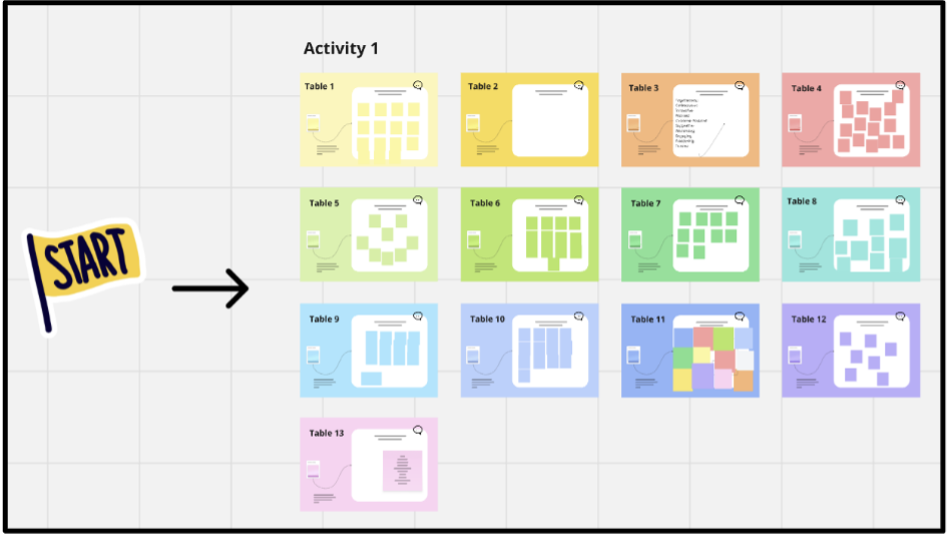
At an away day for the People and Organisational Development (POD) team, with 90 participants, Miro was used to foster an environment where everyone could contribute meaningfully to group discussions (Figure 1). To achieve this, we used Miro as our interactive platform. Rather than giving every attendee direct access to the boards, which could have become overwhelming, we nominated one person per table to capture ideas on behalf of their group. This approach kept the process focused while ensuring all voices were represented.
The benefits were clear. Using Miro saved us considerable time compared to traditional methods, where collating handwritten notes after an event can be labour-intensive. The AI-powered summarisation feature was particularly valuable: it helped us quickly theme and synthesise outputs from each activity, enabling us to share clear, actionable insights with stakeholders soon after the event.
Example 2 – Sarah Moriarty
How do you run a design project across two continents: England and India? For Unit X, Level 4 Product Design, the answer was simple: Miro. This three-session Collaborative Online International Learning (COIL) workshop challenged students to rethink mental health and wellbeing on campus while imagining future creative and virtual learning spaces.
Every stage of the project, from research and brainstorming to sharing ideas and presenting concepts, happened on Miro. The platform became a vibrant hub where teams collaborated in real time, turning a complex, cross-border challenge into an interactive, visually rich experience. For these students, Miro wasn’t just a tool; it was the studio that made global co-creation possible.
Example 3 – Professor Fiona Saunders
The Director of LEED has embraced Miro over the last 12 months as a key tool for collaborative planning and working. Beginning with attending a Miro training session, hosted by LEED Digital Education Specialists, she has since experimented with using Miro boards to lead a broad range of education enhancement projects. These have included collaborative thinking around the design of our future library at Manchester Met, strategic thinking about the remit of LEED and collating and sharing exemplars of great education practice across our academic departments. And more ambitiously, all our Manchester Met Teaching Excellence Framework (TEF) preparation activity is now visualised, documented and is being collaboratively developed on a vast Miro board – an approach she would highly recommend.
What did we learn?
Miro’s impact becomes clear when these three examples are viewed together. Across a large in-person workshop, an international student design project, and institution-wide strategic planning, Miro consistently enabled more inclusive participation, clearer collaboration, and faster synthesis of ideas. It supported groups of all sizes, from 90 colleagues in a room to cross-continent student teams, by providing a shared visual space where contributions could be captured, organised, and developed in real time. Whether streamlining complex outputs with AI, acting as a virtual studio for global co-creation, or helping leaders map and shape major university initiatives, Miro proved to be a flexible, scalable tool that strengthens engagement and collective ownership across teaching, learning, and organisational practice.
Integrating technology isn’t about speed; it’s about doing it well. Tools like Miro don’t just save time; they change how ideas are captured, explored, and shared. The challenge is balancing efficiency with inclusivity, ensuring that everyone feels confident using them.
Tips for getting started with Miro
Navigation and setup
- Mouse vs trackpad: Use the right mouse button to pan and the wheel to zoom. Trackpad users can use two-finger swipes to pan and pinch to zoom.
Productivity and efficiency
- Locking elements: To avoid accidentally moving background elements or images, click on them and select the lock icon.
- Rapid creation: While typing in a sticky note, hit Tab to automatically create a new one next to it.
Collaboration and organisation
- Frames are key: Use frames to group items, structure presentations, and export specific sections as PDFs.
- Use the “Bring everyone to me” feature: In the top right corner, click your avatar and select “Bring everyone to me” to guide collaborators during a presentation.
- Use AI for sorting: Automatically group and cluster sticky notes by keyword, colour, or sentiment.
Discover more about Miro and Sarah Moriarty’s project in Sarah’s episode of the DELTA podcast series.